
Note: This page refers to the Camera2 package. Unless your app requires specific, low-level features from Camera2, we recommend using CameraX. Both CameraX and Camera2 support Android 5.0 (API level 21) and higher.
Many modern Android devices have two or more cameras on the front, back, or both sides of the device. Each lens can have unique capabilities, such as burst capture, manual control, or motion tracking. An app for depositing checks might only use the first rear-facing camera, whereas a social media app might default to a front-facing camera, but give users the option to switch between all available lenses. It can also remember their choices.
This page covers how to list camera lenses and their capabilities so that you can make decisions within your app about which lens to use in a given situation. The following code snippet retrieves a list of all cameras and iterates over them:
try { val cameraIdList = cameraManager.cameraIdList // may be empty // iterate over available camera devices. for (cameraId in cameraIdList) { val characteristics = cameraManager.getCameraCharacteristics(cameraId) val cameraLensFacing = characteristics.get(CameraCharacteristics.LENS_FACING) val cameraCapabilities = characteristics.get(CameraCharacteristics.REQUEST_AVAILABLE_CAPABILITIES) // check if the selected camera device supports basic features // ensures backward compatibility with the original Camera API. val isBackwardCompatible = cameraCapabilities?.contains( CameraMetadata.REQUEST_AVAILABLE_CAPABILITIES_BACKWARD_COMPATIBLE ) ?: false // ... } } catch (e: CameraAccessException) { e.message?.let { Log.e(TAG, it) } // ... }
The variable cameraLensFacing describes the direction that the camera faces
relative to the device screen, and has one of the following values:
CameraMetadata.LENS_FACING_FRONTCameraMetadata.LENS_FACING_BACKCameraMetadata.LENS_FACING_EXTERNAL
For more information about the lens-facing configuration, see
CameraCharacteristics.LENS_FACING.
The variable cameraCapabilities from the preceding code sample contains
information about miscellaneous capabilities, including whether the camera is
able to produce standard frames as an output (as opposed to, for example, only
depth sensor data). You can look for whether
CameraMetadata.REQUEST_AVAILABLE_CAPABILITIES_BACKWARD_COMPATIBLE
is one of the camera's listed capabilities, which is stored as a flag in
isBackwardCompatible.
Choose sensible defaults
In your app, you likely want to open a specific camera by default (if it's available). For example, a selfie app likely opens the front-facing camera, while an augmented reality app might start with the back camera. The following function returns the first camera that faces a given direction:
fun getFirstCameraIdFacing( cameraManager: CameraManager, facing: Int = CameraMetadata.LENS_FACING_BACK ): String? { try { // Get list of all compatible cameras. val cameraIds = cameraManager.cameraIdList.filter { val characteristics = cameraManager.getCameraCharacteristics(it) val capabilities = characteristics.get(CameraCharacteristics.REQUEST_AVAILABLE_CAPABILITIES) capabilities?.contains( CameraMetadata.REQUEST_AVAILABLE_CAPABILITIES_BACKWARD_COMPATIBLE ) ?: false } // Iterate over the list of cameras and return the first one matching desired // lens-facing configuration. cameraIds.forEach { val characteristics = cameraManager.getCameraCharacteristics(it) if (characteristics.get(CameraCharacteristics.LENS_FACING) == facing) { return it } } // If no camera matched desired orientation, return the first one from the list. return cameraIds.firstOrNull() } catch (e: CameraAccessException) { e.message?.let { Log.e(TAG, it) } return null } }
Enable switching cameras
Many camera apps give users the option to switch between cameras:
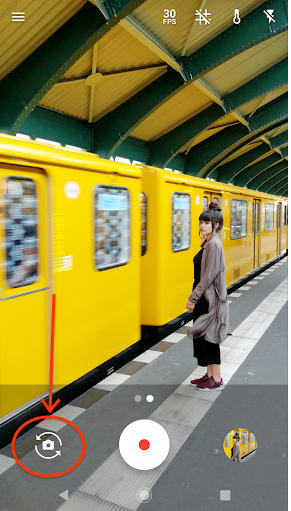
Many devices have multiple cameras that face the same direction. Some even have external USB cameras. To provide users with a UI that lets them switch between different facing cameras, choose the first available camera for each possible lens-facing configuration.
Although there is no universal logic for selecting the next camera, the following code works for most use cases:
fun filterCompatibleCameras( cameraIds: Array<String>, cameraManager: CameraManager ): List<String> { return cameraIds.filter { val characteristics = cameraManager.getCameraCharacteristics(it) characteristics.get(CameraCharacteristics.REQUEST_AVAILABLE_CAPABILITIES)?.contains( CameraMetadata.REQUEST_AVAILABLE_CAPABILITIES_BACKWARD_COMPATIBLE ) ?: false } } fun filterCameraIdsFacing( cameraIds: List<String>, cameraManager: CameraManager, facing: Int ): List<String> { return cameraIds.filter { val characteristics = cameraManager.getCameraCharacteristics(it) characteristics.get(CameraCharacteristics.LENS_FACING) == facing } } fun getNextCameraId(cameraManager: CameraManager, currCameraId: String? = null): String? { // Get all front, back and external cameras in 3 separate lists. val cameraIds = filterCompatibleCameras(cameraManager.cameraIdList, cameraManager) val backCameras = filterCameraIdsFacing( cameraIds, cameraManager, CameraMetadata.LENS_FACING_BACK ) val frontCameras = filterCameraIdsFacing( cameraIds, cameraManager, CameraMetadata.LENS_FACING_FRONT ) val externalCameras = filterCameraIdsFacing( cameraIds, cameraManager, CameraMetadata.LENS_FACING_EXTERNAL ) // The recommended order of iteration is: all external, first back, first front. val allCameras = ( externalCameras + listOf( backCameras.firstOrNull(), frontCameras.firstOrNull() ) ).filterNotNull() // Get the index of the currently selected camera in the list. val cameraIndex = allCameras.indexOf(currCameraId) // The selected camera may not be in the list, for example it could be an // external camera that has been removed by the user. return if (cameraIndex == -1) { // Return the first camera from the list. allCameras.getOrNull(0) } else { // Return the next camera from the list, wrap around if necessary. allCameras.getOrNull((cameraIndex + 1) % allCameras.size) } }
This code works for a large set of devices with many different
configurations. For more information on accounting for edge cases, see
CameraMetadata.REQUEST_AVAILABLE_CAPABILITIES_LOGICAL_MULTI_CAMERA.
Create compatible apps
For apps still using the deprecated Camera API, the number of cameras that
Camera.getNumberOfCameras() returns depends on OEM
implementation. If there is a logical multi-camera in the system, to maintain
app backward compatibility, this method will only expose one camera for every
logical camera and underlying physical cameras group. Use the Camera2 API to see
all cameras.
For more background information on camera orientations, see
Camera.CameraInfo.orientation.
In general, use the Camera.getCameraInfo() API to query all
camera orientations, and expose only one camera for
each available orientation to users that are switching between cameras.
Accommodate all device types
Don't assume that your app always runs on a handheld device with one or two cameras. Instead, choose the most appropriate cameras for the app. If you don't need a specific camera, select the first camera that faces the chosen direction. If the camera facing a certain direction isn't available, consider whether the user can complete their journey with a different camera. Don't restrict your app's availability on certain devices based on camera hardware. If an external camera is connected, the user probably prefers it as the default.