

Android 10 is built around three important themes. First, Android 10 is shaping the leading edge of mobile innovation with advanced machine-learning and support for emerging devices like foldables and 5G enabled phones. Next, Android 10 has a central focus on privacy and security, with almost 50 features that give users greater protection, transparency, and control. Finally, Android 10 expands users' digital wellbeing controls so individuals and families can find a better balance with technology.
Here's a look at what's in Android 10 for developers and how you can use it today.
Innovation and new experiences
With Android 10 you can take advantage of the latest hardware and software innovations to build amazing app experiences for users.
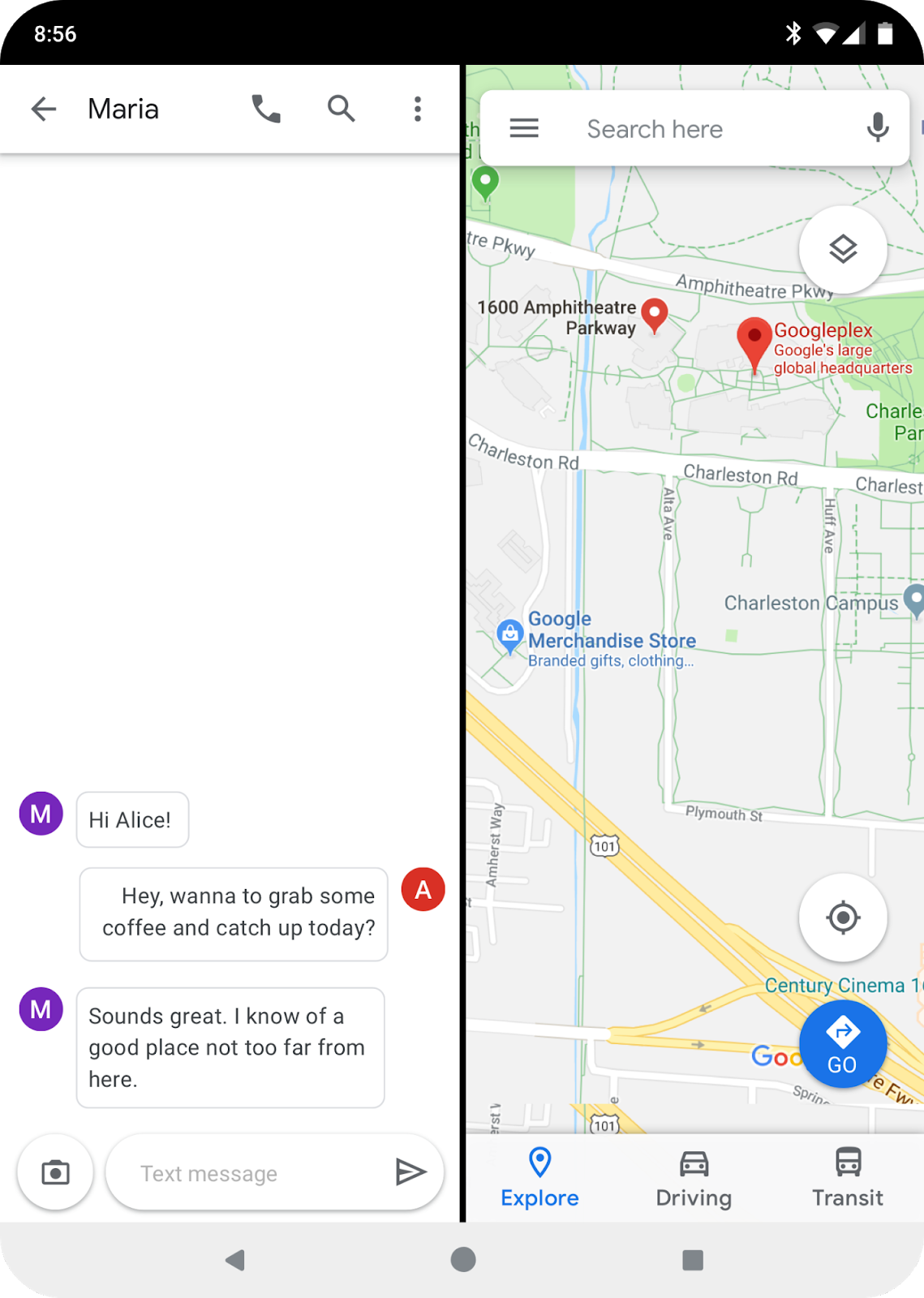
With Android 10 you can optimize your apps for foldables and other large-screen devices.
Foldables
Building on robust multi-window support, Android 10 extends multitasking across
app windows and provides screen continuity to maintain your app state as the
device folds or unfolds. Android 10 adds a number of improvements in
onResume() and
onPause() to support
multi-resume and notify your app when it has focus. It also changes how the
resizeableActivity manifest attribute works, to help
you manage how your app is displayed on foldable and large screens. To help you
build for foldable devices, you can configure a foldable emulator as a virtual
device (AVD) in Android Studio. For details on how to optimize your apps for
foldables, see Learn about foldables.
5G networks
5G promises to deliver consistently faster speeds and lower latency. Android 10
adds platform support for 5G and extends
ConnectivityManager to help you
take advantage of these enhancements. You can use connectivity APIs to detect if
the device has a high bandwidth connection and check whether the connection is
metered. With these, your apps and games can tailor rich, immersive experiences
to users over 5G.
Smart Reply in notifications
Android 10 uses on-device ML to suggest contextual actions in notifications,
such as smart replies for messages or opening a map for an address in the
notification. Your apps can take advantage of this feature right away, without
you needing to do anything. System-provided smart replies and actions are
inserted directly into notifications by default. You can still supply your own
replies and actions if you want. To opt out of Smart Reply on a per-notification
basis, use setAllowGeneratedReplies() and
setAllowSystemGeneratedContextualActions().
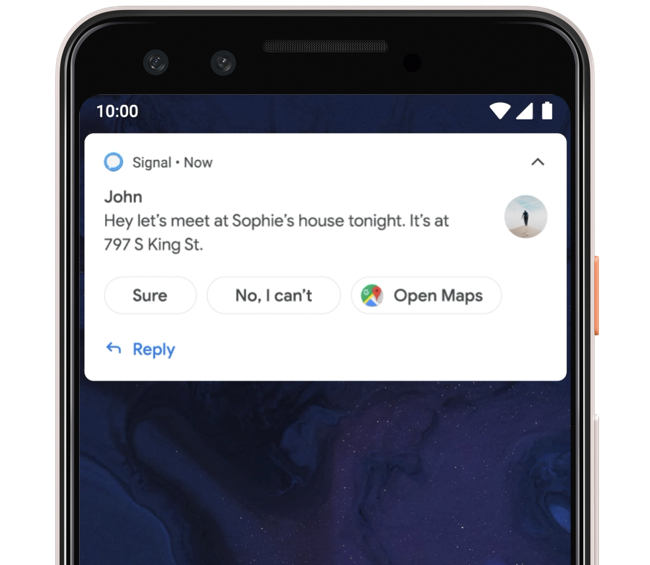
Smart Reply can suggest actions based on notification content.
Dark Theme
Android 10 adds a system-wide dark theme that's ideal for low light and helps save battery. Users can activate a new system-wide dark theme by going to Settings or turning on Battery Saver. This changes the system UI to dark, and enables the dark theme of apps that support it. You can build a custom dark theme for your app or opt-in to a Force Dark feature that lets the system dynamically create a dark version from your existing theme. You can also take advantage of AppCompat's DayNight feature to offer a dark theme for users on lower versions of Android. For more information, see Dark theme.
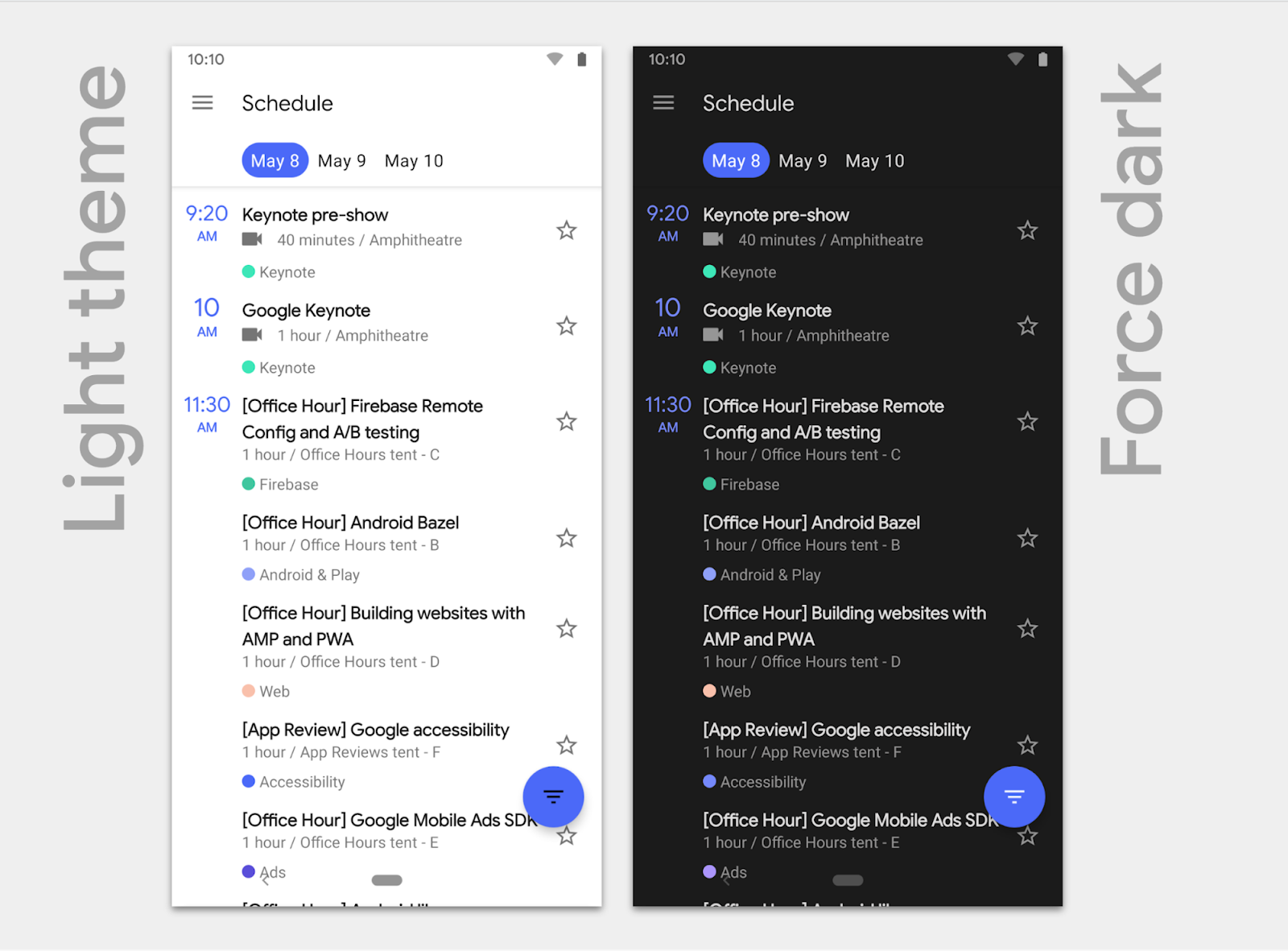
Android 10 can create a dark theme for your app dynamically with Force Dark.
Gesture navigation
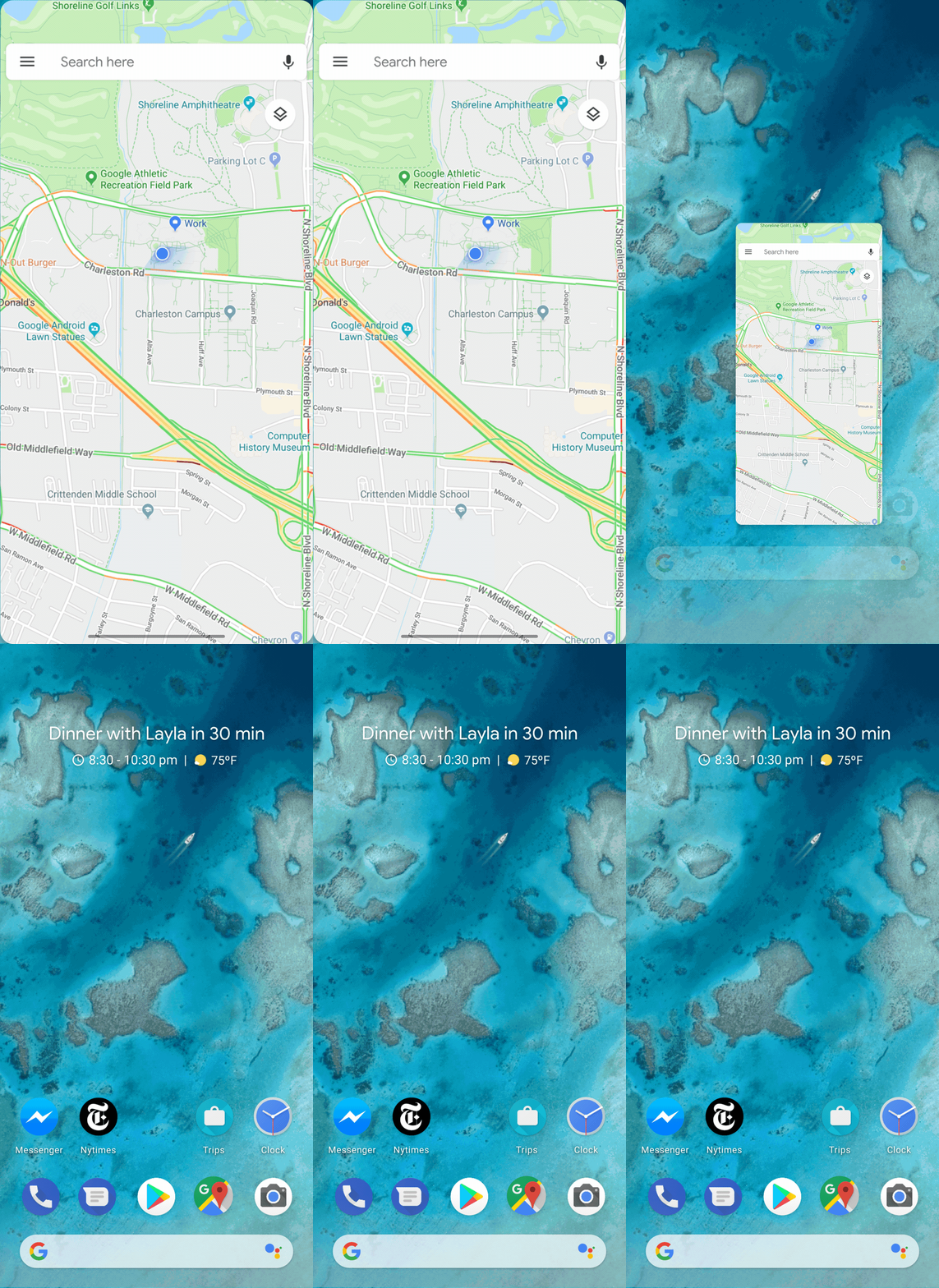
Gesture navigation gives apps the full screen for content.
Android 10 introduces a fully gestural navigation mode that eliminates the
navigation bar area and allows apps to use the full screen to deliver richer,
more immersive experiences. It retains the familiar Back, Home, and Recents
navigation through edge swipes rather than visible buttons. To blend seamlessly
with gesture navigation, go edge-to-edge, drawing behind the navigation bar to
create an immersive experience. To implement this, use the
setSystemUiVisibility() API to lay out your app
fullscreen, and then handle
WindowInsets as appropriate to ensure
that important pieces of UI aren't obscured. For more information, see
Gesture navigation and the
Gesture navigation blog post series.
Settings Panels
You can show key system settings directly in the context of your app through a
Settings.Panel API. A settings
panel is a floating UI that you invoke to show settings that users might need,
such as internet connectivity, NFC, and audio volume. For example, a browser can
display a panel with connectivity settings like Airplane Mode, Wi-Fi (including
nearby networks), and Mobile Data. To display a settings panel, fire an intent
with one of the Settings.Panel actions.
Sharing shortcuts
Sharing Shortcuts makes sharing quicker and easier, letting users jump directly
to another app to share content. Developers can publish share targets that
launch a specific activity in their apps with content attached, and these are
shown to users in the share UI. Because they're published in advance, the share
UI loads instantly when launched. Sharing Shortcuts is similar to App Shortcuts
and uses the same
ShortcutInfo API. The API is
also supported in the ShareTarget AndroidX library. For more information, see
the Sharing Shortcuts sample app.
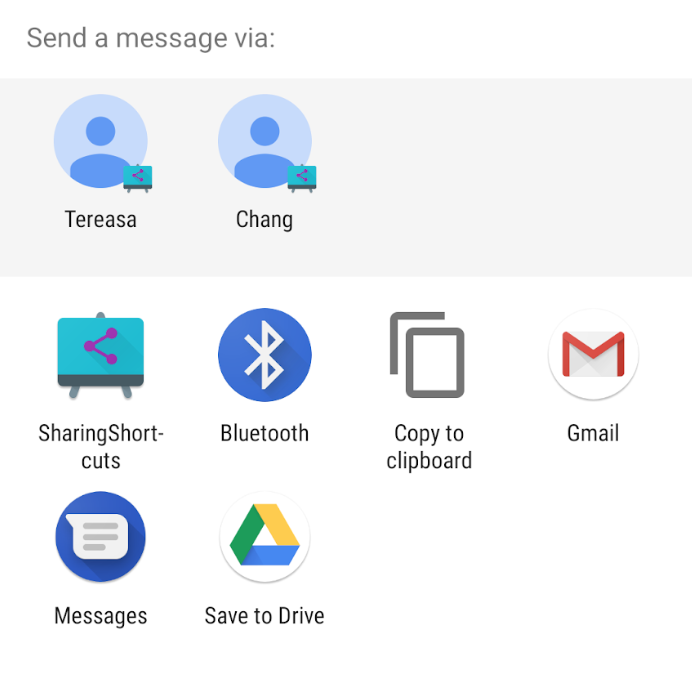
Sharing shortcuts let users jump directly to a specific activity in your apps with content attached.
Privacy for users
Privacy is a central focus in Android 10, from stronger protections in the platform to new features designed with privacy in mind. Building on previous releases, Android 10 includes extensive changes to protect privacy and give users more control, with improved system UI, stricter permissions, and restrictions on what data apps can use. For more information about how to support these changes in your apps, see Privacy changes.
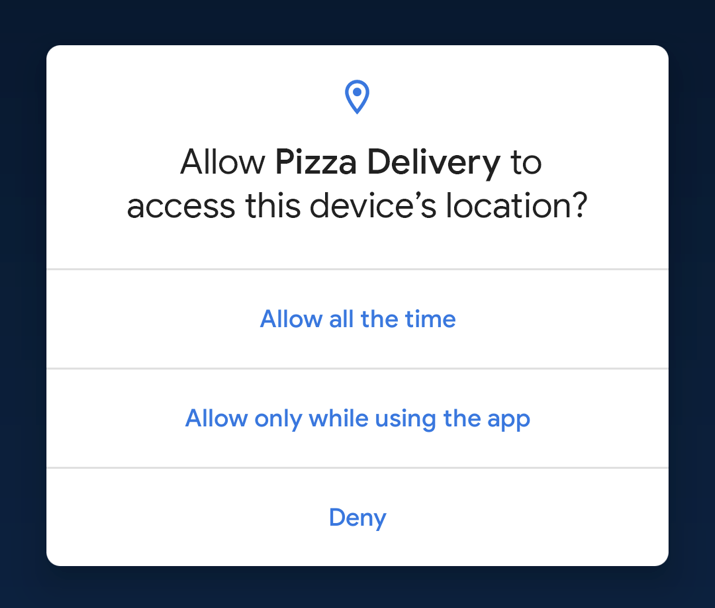
Users can now choose to grant access to location when the app is in the foreground.
Giving users more control over location data: Users have more control over their location data through a permission option—they can allow an app to access location only while the app is actually in use (running in the foreground). For most apps, this provides a sufficient level of access, while for users it's a big improvement in transparency and control. For more information about location changes, see Request location updates or the Android Developers location blog post.
Protecting location data in network scans: Most of the APIs for scanning networks already required the coarse location permission. Android 10 increases the protection around those APIs by requiring the fine location permission instead.
Preventing device tracking: Apps can no longer access non-resettable device identifiers that could be used for tracking, including device IMEI, serial number, and similar identifiers. The device's MAC address is also randomized when connected to Wi-Fi networks by default. For more information, see Best practices for unique identifiers and Restriction on non-resettable device identifiers.
Securing user data in external storage: Android 10 introduces a number of
changes to give users more control over files in external storage and the app
data within them. Apps can store their own files in their private sandboxes, but
must use MediaStore to access shared media files and use the system file
picker to access shared files in the Downloads collection. For more information,
see Scoped storage.
Blocking unwanted interruptions: Android 10 prevents app launches from the background that unexpectedly jump into the foreground and take over focus from another app. For more information, see Background activity starts.
Security
Android 10 introduces a number of security features that keep users more secure through advances in encryption, platform hardening, and authentication. For more information, see What's new in Android Q security.
Storage encryption: All compatible devices launching with Android 10 are required to encrypt user data, and to make this more efficient, Android 10 includes Adiantum, our encryption mode.
TLS 1.3 by default: Android 10 also enables TLS 1.3 by default, a major revision to the TLS standard with performance benefits and enhanced security.
Platform hardening: Android 10 also includes hardening for security-critical areas of the platform.
Improved Biometrics: Android 10 extends the
BiometricPrompt framework to support passive
authentication methods such as face, and adding implicit and explicit
authentication flows. In the explicit flow, the user must explicitly confirm the
transaction in the TEE during the authentication. The implicit flow is designed
for a lighter-weight alternative for transactions with passive authentication.
Android 10 also improves the fallback for device credentials when needed. For
more information, see
Show a biometric authentication dialog.
Camera and media
Dynamic depth for photos
Apps can request a Dynamic Depth image, which consists of a JPEG, XMP metadata related to depth related elements, and a depth and confidence map embedded in the same file. These let you offer specialized blurs and bokeh options in your app. Dynamic Depth is an open format for devices running Android 10 (API level 29) and higher. For more information, see the Dynamic Depth specification (PDF).



With Dynamic Depth image you can offer specialized blurs and bokeh options in your app.
Audio playback capture
Any app that plays audio can let other apps capture its audio stream using the audio playback capture API. In addition to enabling captioning and subtitles, the API lets you support popular use-cases like live-streaming games. Because this capability is built with privacy and copyright protection in mind, the ability for an app to capture another app's audio is constrained, giving apps full control over whether their audio streams can be captured. For more information, see Capturing Audio in Android Q.
New audio and video codecs
Android 10 adds support for the open source video codec
AV1, which lets media
providers stream high quality video content to Android-powered devices
using less bandwidth. In addition, Android 10
supports audio encoding using
Opus—an open, royalty-free codec
optimized for speech and music streaming—and
HDR10+ for high dynamic range video on devices that
support it. The MediaCodecInfo API
introduces an easier way to determine the video rendering capabilities of an
Android-powered device. For any given codec, you can obtain a list of supported
sizes and frame rates.
Native MIDI API
For apps that perform their audio processing in C++, Android 10 introduces a native MIDI API to communicate with MIDI devices through the NDK. This API allows MIDI data to be retrieved inside an audio callback using a non-blocking read, enabling low latency processing of MIDI messages. Give it a try with the sample app and source code here.
Directional, zoomable microphones
Android 10 gives you more control over audio capture through a new
MicrophoneDirection API. You can use the API to
specify a preferred direction of the microphone when taking an audio
recording. For example, when the user is taking a "selfie" video, you can
request the front-facing microphone for audio
recording (if it exists). Additionally, this API introduces a standardized way
of controlling zoomable microphones, allowing your app to have control over the
recording field dimension.
Vulkan everywhere
Android 10 expands the impact of Vulkan with our implementation of the low-overhead, cross-platform API for high-performance 3D graphics. Vulkan 1.1 is now a requirement on all 64-bit devices running Android 10 and higher, and a recommendation for all 32-bit devices. We already see significant momentum on Vulkan support in the ecosystem - among devices running Android N or above, 53% support Vulkan 1.0.3 or higher. With the new requirement in Android 10, we expect to see adoption improve further in the coming year.
Connectivity
Improved peer-to-peer and internet connectivity
Android 10 refactors the Wi-Fi stack to improve privacy and performance, and also to improve common use-cases like managing IoT devices and suggesting internet connections—without requiring the location permission. The network connection APIs make it easier to manage IoT devices over local Wi-Fi, for peer-to-peer functions like configuring, downloading, or printing. The network suggestion APIs let apps surface preferred Wi-Fi networks to the user for internet connectivity.
Wi-Fi performance modes
Apps can request adaptive Wi-Fi by enabling high performance and low latency
modes. These can be a great benefit where low latency is important to the user
experience, such as real-time gaming, active voice calls, and similar
use-cases. The platform works with the device firmware to meet the requirement
with the lowest power consumption. To use the performance modes, call
WifiManager.createWifiLock() with
WIFI_MODE_FULL_LOW_LATENCY or WIFI_MODE_FULL_HIGH_PERF.
Android foundations
ART optimizations
Improvements in the ART runtime help your apps start faster, consume less memory, and run smoother—without requiring any work from you. ART profiles delivered by Google Play let ART pre-compile parts of your app even before it's run. At runtime, Android 10 adds Generational Garbage Collection to ART's Concurrent Copying (CC) Garbage Collector to make garbage collection more efficient in terms of time and CPU, reduce jank, and help apps run better on lower-end devices.
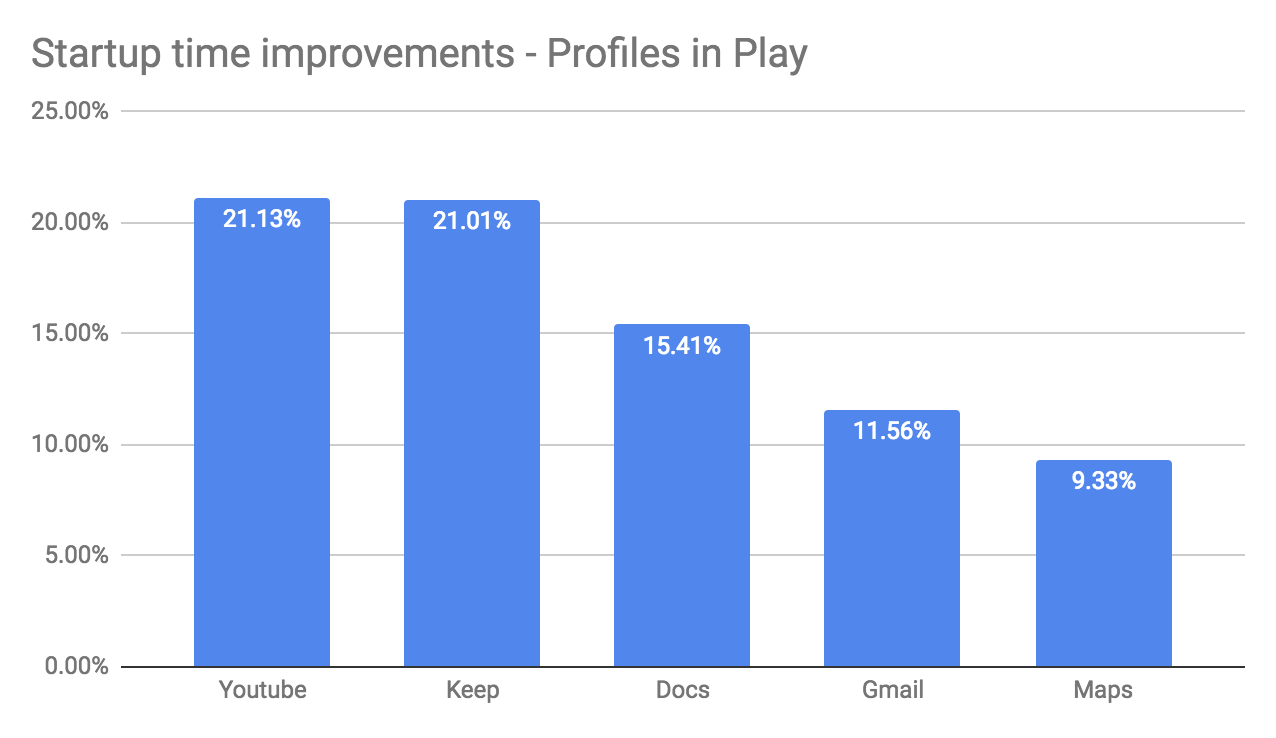
This chart shows the percentage improvement in startup time for specific apps when tested using Play profiles.
Neural Networks API 1.2
Android 10 adds 60 ops including ARGMAX, ARGMIN, and quantized LSTM, alongside a range of performance optimizations. This lays the foundation for accelerating a much greater range of models—such as those for object detection and image segmentation. Google collaborates with hardware vendors and popular machine learning frameworks such as TensorFlow to optimize and deliver support for NNAPI 1.2.
Thermal API
When devices get too warm, they might throttle the CPU, GPU, or both, and this throttling can affect apps and games in unexpected ways. In Android 10, apps and games can use a thermal API to monitor changes on the device and take action to help restore normal temperature. For example, streaming apps can reduce resolution, bit rate, or network traffic, a camera app can disable flash or intensive image enhancement, or a game can reduce frame rate or polygon tessellation. For more information, see Thermal API.
Compatibility through public APIs
Android 10 continues to expand restrictions on non-SDK interfaces, so that apps gradually move toward only using public APIs. If an interface that you use is restricted, you can request a public API for that interface instead. To help you make the transition and prevent your apps from breaking, Android 10 enables the restrictions only when your app targets Android 10 (API level 29). For more information, see Updates to non-SDK interface restrictions in Android 10.
Faster updates, fresher code
Android 10 is built for faster updates through Project Treble, which provides a consistent, testable interface between Android and the underlying device code from device makers and silicon manufacturers. Through Treble, device makers can bring Android 10 to Treble-compliant devices more quickly and at lower cost.
Android 10 is also the first release to support Project Mainline (officially called Google Play system updates), a technology for securing Android users and keeping their devices fresh with important code changes—direct from Google Play. With Google Play system updates, Google Play can update specific internal components across all devices running Android 10 and higher, without requiring a full system update from the device manufacturer.
For developers, these updates in Android 10 help drive consistency of platform implementation broadly across devices, and over time bring greater uniformity that reduces your development and testing costs.
Get started
For complete developer resources for Android 10, visit developer.android.com/10.